The same chart changes when someone else reruns the analysis. The same data tells a different story when the axis changes. Details like these often undermine a Data Agent’s credibility.
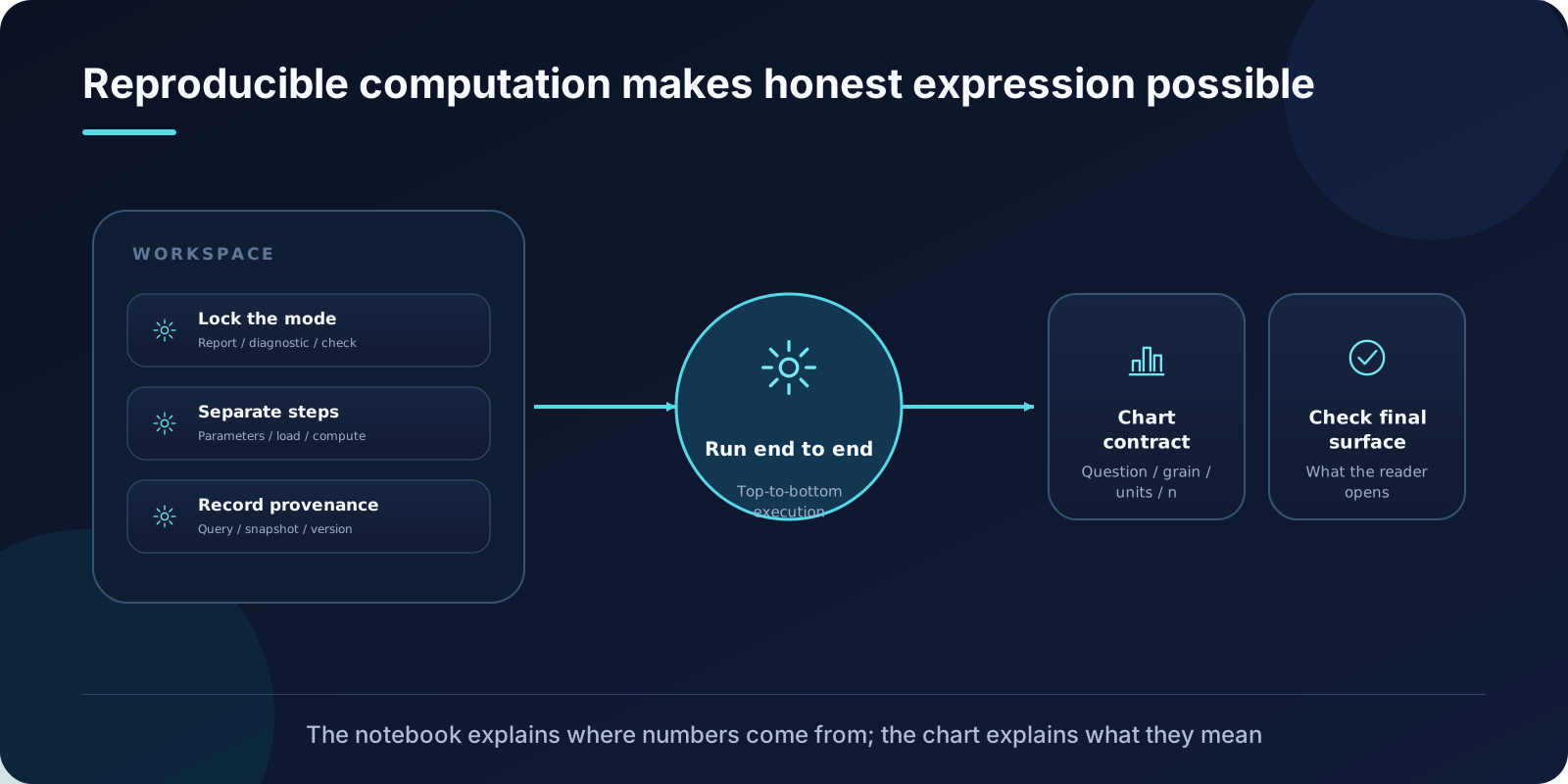
Data Analytics Skills divides this work between two Skills: Jupyter Notebooks makes the calculations reproducible, while Visualize Data keeps their presentation from misleading readers. The first explains where a number comes from; the second establishes what a chart can support.
A notebook is more than a pile of draft code
The source requires the notebook’s mode and scope to be established first. Is it an analytical report, an experiment log, a diagnostic record, a quality check, a market estimate, a modeling exploration, or a supporting deliverable? The audience, the decision it supports, and the expected handoff must all be clear before work begins.
The default structure for an analytical notebook is:
## tl;dr
## Context & Methods
## Data
## Results
## Takeaways
The key constraint is that the tl;dr and takeaways must be written after inspecting the execution outputs. The summary should cite specific observed values, visible patterns, row counts, or charts, rather than assumptions made in advance. When assumptions affect correctness, add a Key Assumptions subsection under Context & Methods.
This reverses a common habit: writing the conclusion first, then running the numbers to confirm it. That habit can quietly create a gap between the conclusion and the actual output, without giving readers any way to see where they diverge.
Separate the steps and record the sources
The source requires environment setup, imports, parameters, data loading, data preparation, computation, visualization, and interpretation to be separated. When SQL and Python are both involved, complex SQL should remain in SQL cells or separate query files, rather than being buried in long Python strings.
Code cells should be short and have a single responsibility. Each cell should do one thing, preceded by a brief Markdown explanation of its purpose, assumptions, and expected result. Put multiple tables or charts in separate cells instead of dumping every output from one cell.
For every executed result that supports the analysis, the source requires provenance: a query link, request ID, source path, dashboard link, extract name, or another source artifact. Expensive queries need filters and explicit bounds; a notebook should not become an unrestricted scan of live sources.
Reproducibility requires a complete execution
A notebook is complete when it executes successfully from beginning to end. Being able to open the file is insufficient. The source provides this command:
python -m jupyter nbconvert --execute --to notebook --inplace path/to/notebook.ipynb
If data permissions, dependencies, kernels, or credentials prevent execution, say so explicitly. Provide the exact command needed for local verification, along with the missing dependencies, credentials, data access, or environment steps. Old cached outputs cannot serve as evidence of the current run.
The value of this rule is the distinction between two states: “I ran it before” and “It runs now.” The former is history; the latter establishes reproducibility.
Define the comparison before choosing a chart
The first step in Visualize Data is to define the analytical question and a one-sentence takeaway. What should the chart answer? What should readers understand after seeing it? Where will it ultimately appear?
Common starting points include lines for change over time, bars for category comparisons, histograms or box plots for distributions, and scatterplots for relationships between two numeric variables.
These are guides, however, rather than a mechanical lookup table. Two or three time points do not necessarily justify drawing a “trend.” A handful of aggregated points does not necessarily support a meaningful scatterplot pattern. The chart type should serve the comparison being made.
Give every chart a compact contract
Before writing plotting code, the source requires a compact chart contract covering:
- The analytical question and takeaway.
- The chart family and specific variant.
- Data sufficiency: expected row count, number of time points, scatterplot observation count and grain, date range, and a fallback if the data is too sparse.
- The delivery medium and the appropriate chart type for it.
- The color strategy and ways to distinguish series without relying on color.
- Output dimensions, the final container, and the surface on which quality will be checked.
This contract changes the question from “Does this chart look good?” to “Can this chart support this conclusion?”
Units, denominators, time periods, populations, comparison baselines, and sample sizes all belong in the contract. Discussing colors and annotations before settling these details puts presentation ahead of substance.
Good looks cannot compensate for unreliable evidence
The source gives several concrete constraints for honest presentation:
- Bars showing absolute quantities should generally start at zero. A chart specifically examining differences may use a focused range, but its scale must be explicit.
- Multiple series should be distinguished through direct labels, line styles, or markers as well as color.
- Axes, labels, and limitations are all part of the evidence.
- Titles must not overstate what the data supports.
The final step is to inspect the chart on the page readers will actually open. A thumbnail in a plotting window is insufficient. Mobile cards, charts embedded in reports, dashboard components, and slides have very different requirements for text size, whitespace, and contrast.
Why the two Skills belong together
With reproducibility alone, readers can inspect the results but may still be misled by the charts.
With presentation alone, the charts may look excellent, but no one can verify where the numbers came from.
The source’s handoff requirements reflect this dependency: notebook conclusions must agree with executed outputs, and chart conclusions must agree with notebook calculations. If any link breaks, the entire evidence chain fails.
When designing your own analytical deliverables
Three checks you can use immediately:
- If you rerun the notebook from a clean kernel, do you still get the same key numbers?
- Can you state the question each chart answers in a single sentence?
- Once the chart is placed on its final page, are the axes, units, and sample sizes still legible?
The calculation chain explains where a number comes from. The presentation chain establishes what a chart can support. Chart quality is part of analytical credibility, extending all the way to what the reader sees.
Reference: OpenAI Data Analytics Skills public reference repository